Owner & settings
AI assistants (Claude, ChatGPT)
Let Claude, ChatGPT or Claude Code answer questions from your GasDesk books — the connector URL, how to connect, who may connect, safe actions, revoking a connection and the activity log
Who it is for:OwnerManagerDelivery man
On this page
With GasDesk connected to an AI app such as Claude or ChatGPT you can simply ask, in Bangla or English: "How much did we sell today?", "Who has owed us for more than 60 days?", "Which delivery man delivered the most cylinders this month?", "How many full Bex 12 kg are in Jatrabari?" The AI app reads the figures from GasDesk and answers.
This is a separate module (AI assistant connector (MCP)) that must be in your plan. Without it a connected app only sees a message saying it is not in the plan.
What it can and can't do
It can read — only what you can see in GasDesk with your role: today's and this month's sales, cylinder stock (full/empty), customers and dues, sales by day, delivery men's figures, daily deposits, purchases, expenses, the stock ledger and (for owners/managers) profit & loss. A delivery man's connection sees only his own entries.
Safe actions (when the owner allows them):
- Add a line to a customer's notes (e.g. "called, will pay on Friday").
- Save a due-reminder SMS as a draft. GasDesk never sends SMS — the draft waits on the customer's ledger and you check it and send it from your phone (SMS drafts).
It can never: enter sales, recoveries or expenses, delete or cancel anything, change prices, stock or settings, or see staff or passwords.
Owner: Settings → AI assistants (MCP)
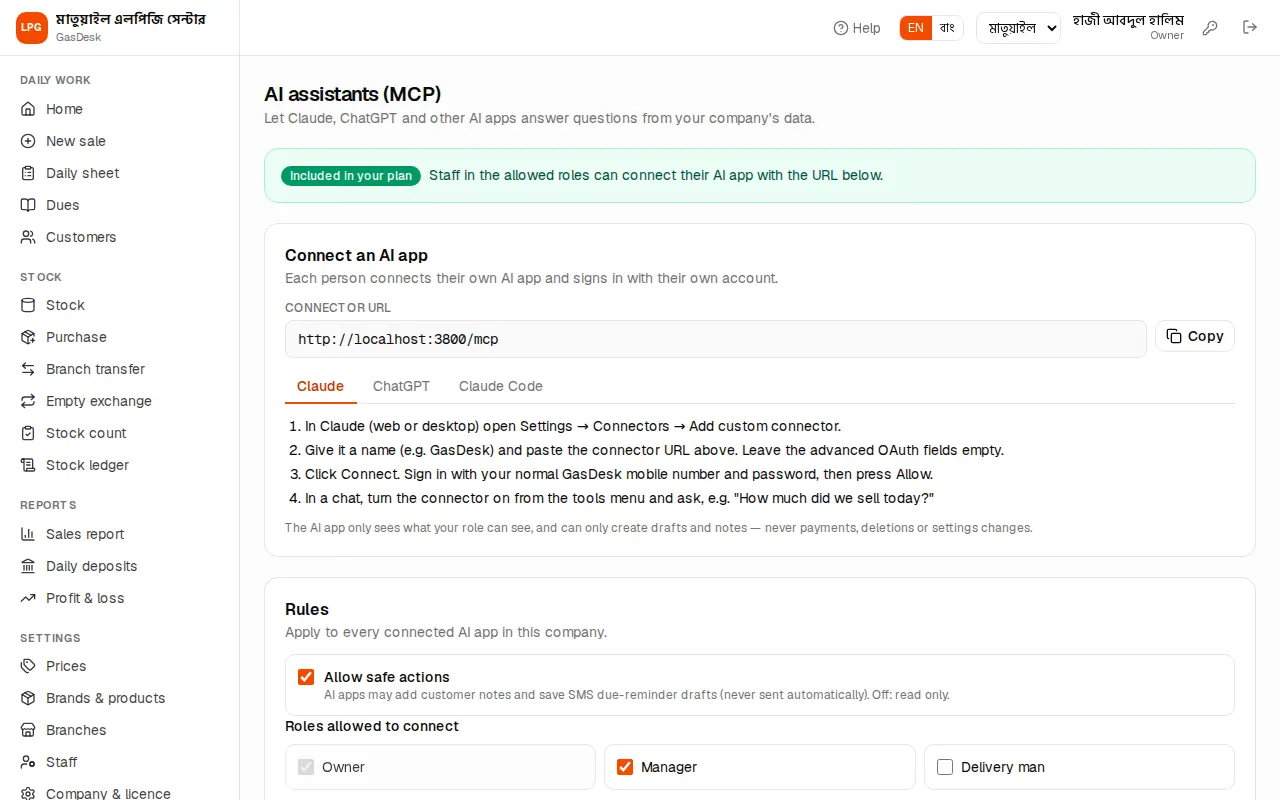
On Settings → AI assistants (MCP):
- At the top, green Included in your plan or yellow Not in your plan.
- Connect an AI app: the Connector URL (e.g.
https://…/mcp) with a copy button, and steps for Claude / ChatGPT / Claude Code. - Rules:
- Allow safe actions — off means AI apps can only read, not add notes or drafts.
- Roles allowed to connect — the owner always may; managers may by default; tick Delivery man to allow delivery men too. Press Save after changing.
- Connected apps: who connected which AI app, Read only or Read + safe actions, when it was connected and last used. Revoke cuts any connection off immediately.
- Recent activity: the last 50 requests from AI apps — when, who, which app, which tool, the result. The log is kept for 180 days.
Connecting Claude
- In GasDesk open My AI connections (or, for the owner, Settings → AI assistants (MCP)) and copy the Connector URL.
- In Claude (web or desktop) open Settings → Connectors → Add custom connector.
- Give it a name (e.g. GasDesk) and paste the URL. Leave the advanced OAuth fields empty.
- Press Connect. A GasDesk page opens — sign in with your own mobile number and password.
- On the permission page check which company you are connecting, decide whether to keep "safe actions" ticked, and press Allow.
- In a chat, turn the connector on from the tools menu and ask away.
ChatGPT: turn on Developer mode in Settings → Apps & Connectors → Advanced (needs a plan that allows custom connectors), then create a connector with the URL and OAuth authentication; the rest is the same.
Claude Code: run the claude mcp add --transport http … command shown on the page in a terminal, then type /mcp inside Claude Code and choose Authenticate.
My AI connections (everyone)
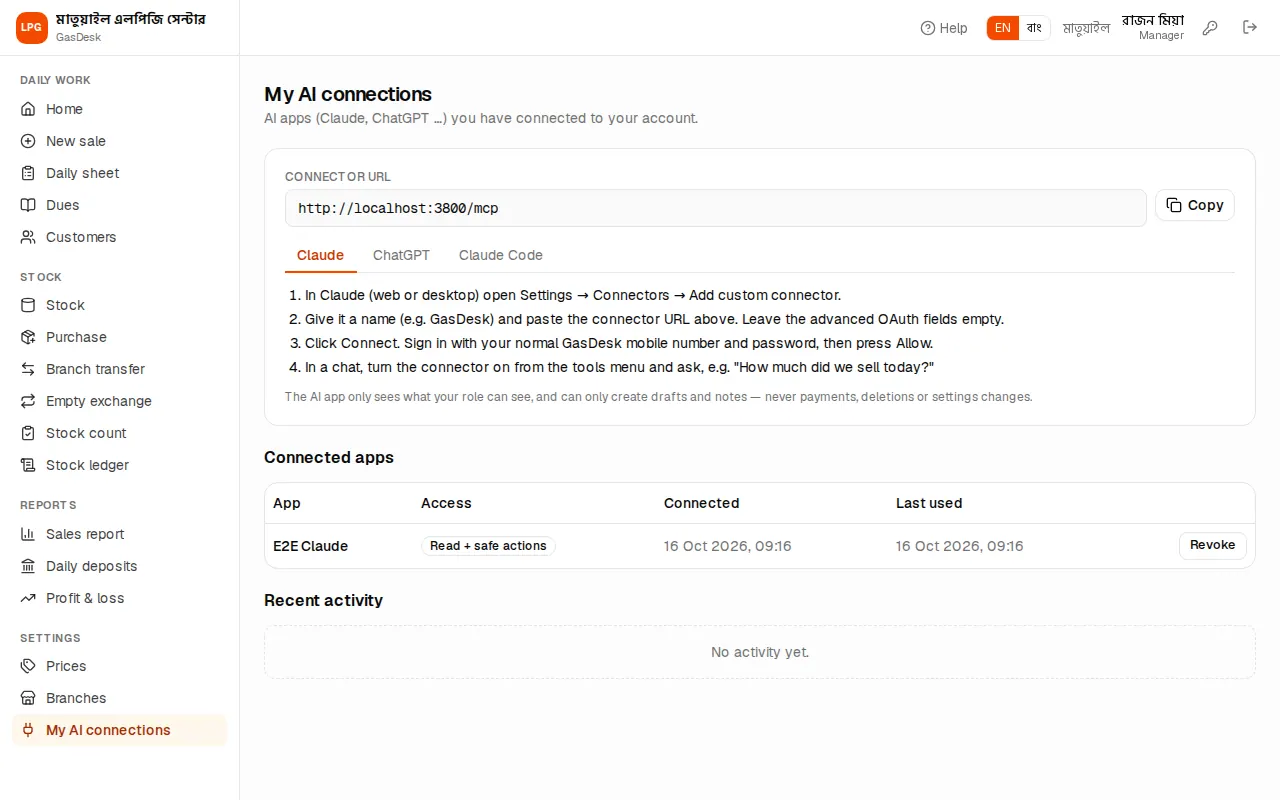
The My AI connections page in the menu shows each person their own: the connector URL and steps, their connected apps (with Revoke) and their recent activity. If the module is not in the plan, or the owner has not allowed your role, it says so.
A few useful questions
- "Give me today's summary — sales, cash, dues, and how many full cylinders each branch has."
- "Who has dues older than 60 days? Write a polite Bangla SMS for each." — check the drafts, say "OK", and the assistant saves them as drafts.
- "Show Karim's and Sohel's sales, dues and commission this month side by side."
- "How many Bex 12 kg refills did we buy from the company last week?"
Mistake to avoid: Check the AI's answer against the GasDesk pages once, especially money. And don't let anyone else use your AI app account — that app sees GasDesk in your name.