Daily work
Daily sheet & day closing
The paper Daily Sales Report on screen — the 1+2+3−5−6=7 deposit box, adding expenses, sales and recovery lists, the cylinder account, closing the day against the cash counted, reopening and printing the sheet
Who it is for:OwnerManagerDelivery man
On this page
The Daily sheet page is laid out like the shop's paper "Daily Sales Report": the day's cash box at the top, then the sale lines, due recoveries, expenses and the cylinder account at the bottom. Every person has their own sheet for every day — in the evening each person checks their sheet and presses Close day.
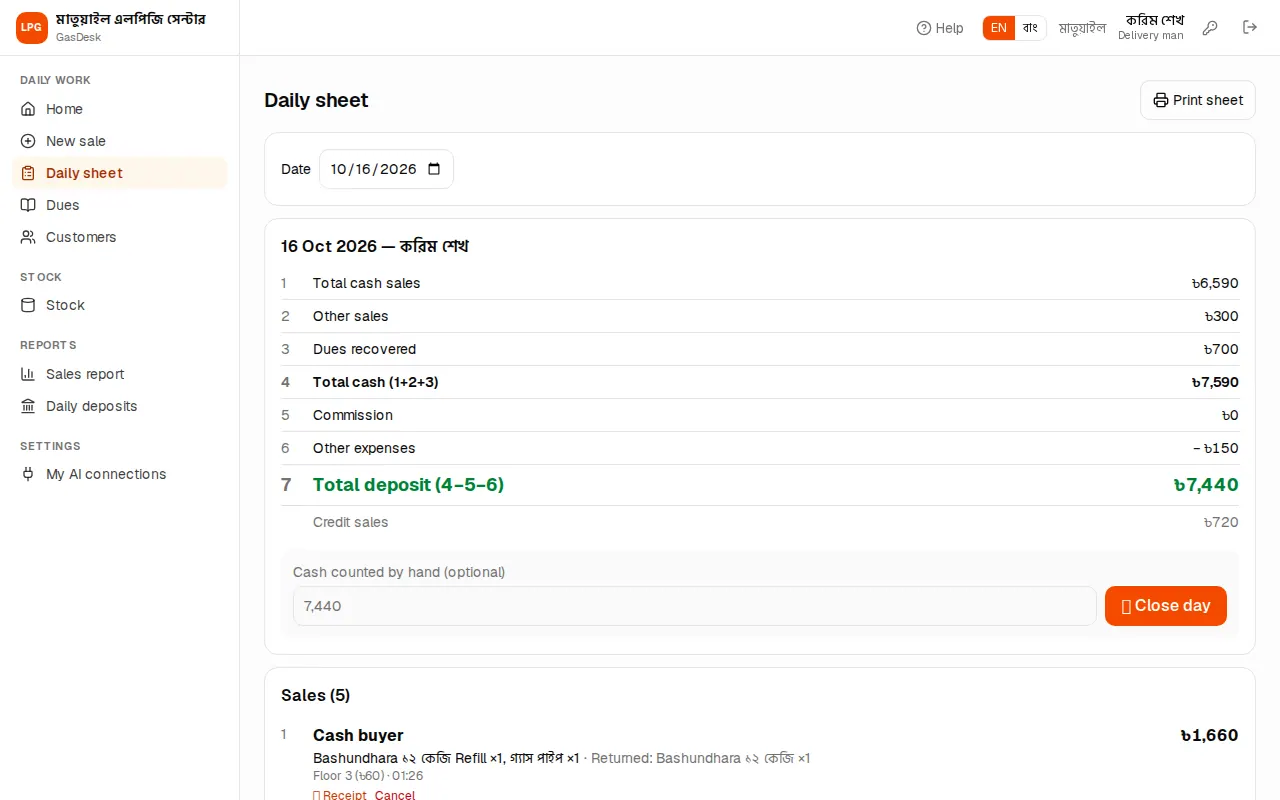
Whose sheet, which day
- A delivery man always sees his own sheet. He can change the Date to look at earlier days, but new entries and closing are for today only.
- Managers and owners can pick any staff member in Staff, or Everyone for the whole branch together. It opens on your own sheet.
The deposit box: 1+2+3−5−6=7
The box from the bottom-right corner of the paper sheet is at the top here:
| No. | Line | Meaning |
|---|---|---|
| 1 | Total cash sales | Cash received for gas |
| 2 | Other sales | Cash for regulators, pipes etc. |
| 3 | Dues recovered | Old dues collected today |
| 4 | Total cash (1+2+3) | All the cash that came in today |
| 5 | Commission | Commission handed to company buyers |
| 6 | Other expenses | Fuel, snacks and other spending |
| 7 | Total deposit (4−5−6) | The money to hand to the manager/owner |
Below, in grey, Credit sales — what went on credit today (no cash came in, so it is not in the deposit).
Sales, recoveries and expenses
The Sales list has one line per sale: buyer name ("Cash buyer" if none), house, address, phone (tap to call), cylinders and type, empties returned, floor, commission, time, total and due. Under each line are 🧾 Receipt and Cancel (see Cancelling a wrong sale).
Below it are today's Dues recovered — who paid how much. A wrong recovery can be removed with Delete (before the day is closed).
Adding expenses
Fuel, van fare, snacks — enter any of the day's spending in the sheet's Other expenses part:
- Type the expense in Head (fuel, snacks…).
- Type the Taka.
- Press Add expense.
The expense goes into line 6 of the box at once and the deposit drops. Remove a wrong expense with Delete. The month's expenses by head are in the profit & loss report.
Cylinder account
At the bottom is the Cylinder account table — like the bottom-left table of the paper sheet. For every cylinder: Refill purchase, Package purchase, Refill sale, Package sale, Empties returned, and at day end Full in stock and Empty in stock. Purchases and stock on hand are for the whole branch; sale counts follow the staff member whose sheet you are looking at.
If your count in the godown does not match, fix it with a stock count.
Closing the day
In the evening everyone closes their own sheet:
- Count the cash and type it in Cash counted by hand (optional). Less than the deposit shows Short: ৳… in red, more shows Over: ৳… in yellow.
- Press 🔒 Close day. It asks "Close the sheet for …? Deposit ৳…. It can't be changed after closing." — press OK.
- The sheet shows a green Closed tag and "Closed by … · time · Deposit ৳… · Counted ৳…".
After closing, that person's day can't get new sales, recoveries or expenses, and nothing can be cancelled or deleted — the day is frozen so the deposit always matches the sheet.
When an earlier day was not closed, Home shows a warning. Check who closed which day in the Daily deposits report (Reports) and close the rest.
Reopening a closed day
If a mistake shows up after closing (a wrong sale, a forgotten expense), a manager or owner opens the sheet and presses Reopen. Fix it and Close day again. A manager can only reopen days in their own branch; a delivery man can't. Who reopened what and when is kept in the audit log.
Printing the sheet
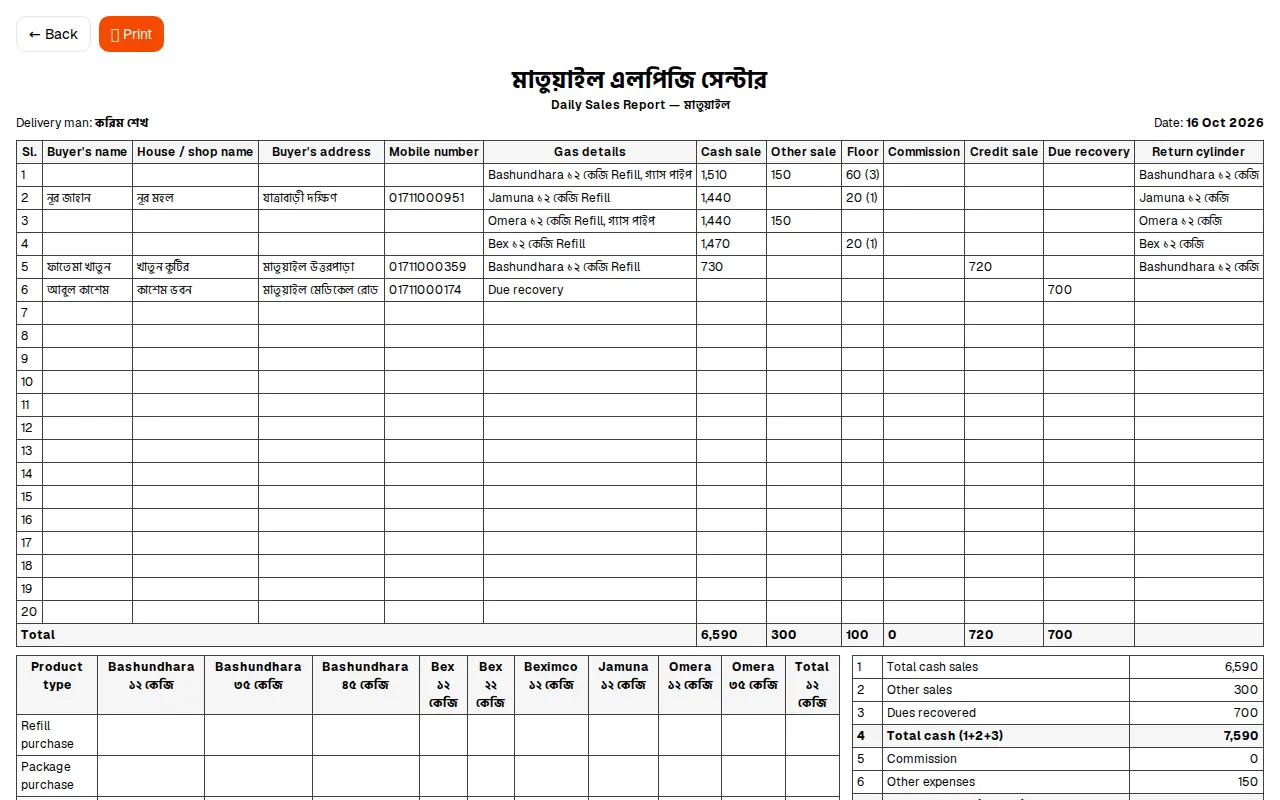
Print sheet at the top opens a sheet laid out like the paper "Daily Sales Report": serial, buyer name and address, cash sale, other sale, credit sale, return cylinders, due recovery, expense details, the cylinder account and the deposit box, with signature lines for the delivery man and the manager. Press Print for paper or PDF.