Daily work
New sale
One line of the paper sheet — buyer, refill or package, other-brand empty returns, floor charge, commission, cash and credit, the receipt and cancelling a wrong sale
Who it is for:OwnerManagerDelivery man
On this page
In GasDesk one sale is one line of the paper "Daily Sales Report": who took it, which cylinders and how many, how many empties came back, floor charge, commission, how much cash was paid and how much is left on credit. Open New sale from the menu (on a phone, from the bottom bar).
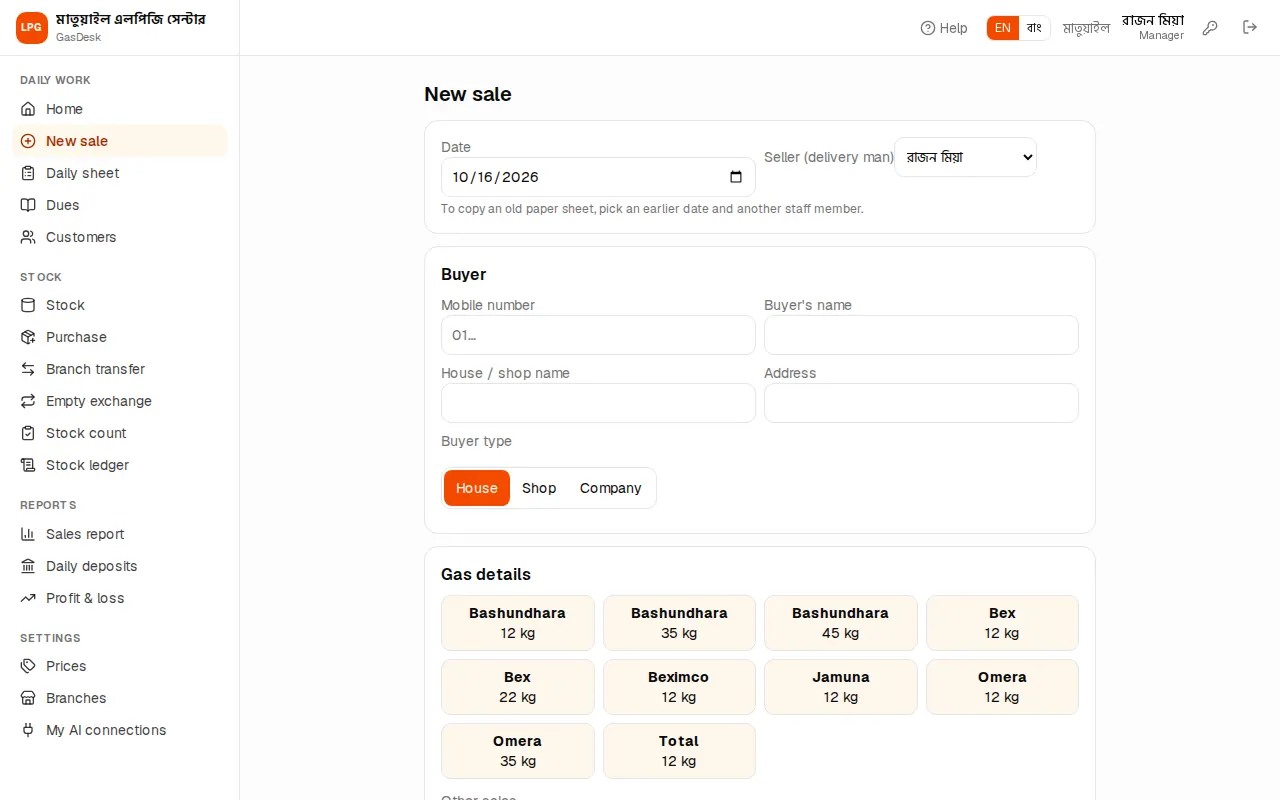
A sale step by step
- Buyer: type the mobile number or name. After 3 characters earlier customers are listed; tap the right one. A previous due shows as a red tag and a yellow line "Previous due: ৳…".
- For a new buyer add the House / shop name, Address and Buyer type (House / Shop / Company). A cash sale needs no buyer name.
- Gas details: tap the button with the brand and kg, e.g. Bex ১২ কেজি. A line is added.
- On the line choose Refill or Package and set the Quantity. The price comes from the branch price list; change it if needed.
- For regulators, pipes and the like, tap + Regulator etc. under Other sales.
- If the cylinder goes upstairs, type the Floor — the Floor charge fills itself in.
- Check the Total bill, set Cash paid, then press ✔ Save sale.
After saving you see ✅ with the invoice number, total and due. From there open ➕ Another sale, 🧾 Receipt or 📋 Daily sheet.
Refill or package
| Type | When | What happens to stock |
|---|---|---|
| Refill | The buyer gives their empty and takes a full; gas price only | One full out, one empty in |
| Package | The buyer takes a new cylinder with gas (first time) | One full out, no empty in |
| Others | Regulator, pipe, stove etc. | That product's stock goes down |
You can't sell more full cylinders than the branch has. It then says e.g. "Bex ১২ কেজি: only 2 full in stock, 3 needed — add stock first". Enter the purchase or transfer first.
Other-brand empty returns
On a refill buyers often hand over another brand's empty — e.g. take a full Bex and give an Omera empty. Under every cylinder line, in the grey box:
- Empty cylinder taken back: which cylinder's empty came in. The same cylinder is selected by default; other brands of the same size are listed first.
- Number returned: how many empties came in. Equal to the quantity for a refill; 0 for a package.
If the buyer gave no empty or fewer, lower the number. The empty of the brand that actually came in is added to stock. Other-brand empties that pile up can later be swapped with another dealer — see Empty exchange.
Floor charge
Typing a floor number in Floor fills the Floor charge with the branch rule: at "per floor ৳20" the 5th floor costs ৳100; at "flat" any floor above the ground costs the same. For special cases type a different amount in the floor charge box. The floor charge is added to the bill. The rule is set on the branches page.
Commission
The person who buys gas for a hotel, restaurant or company often gets a commission. Enter it in Commission (paid to the company buyer).
- Commission does not lower the bill. It is handed over from the buyer's cash, so it comes off the evening deposit. A line says "Commission ৳… is paid from the cash — it comes off the deposit."
- Commission can't be more than the cash paid.
- No commission on a sale that is fully on credit — it says "No commission on a credit sale — lower the price instead".
Cash and credit
Cash paid starts at the full bill (all cash).
- The buyer pays part now and the rest later: type what you received in Cash paid. The Due shows in red.
- Everything on credit: press All due. Back to all cash: All cash.
- A credit sale needs the customer's name or mobile — otherwise "A credit sale needs the customer's name or mobile".
The due is added to the customer's ledger. When it is paid, enter a due recovery.
Mistake to avoid: Cash paid can't be more than the bill. If the buyer also pays an old due, enter that separately as a recovery on the Dues page — then it shows up correctly under "Dues recovered" in the day's cash box.
Entering old paper sheets
Owners and managers see two extra boxes at the top: Date and Seller (delivery man). To copy an old paper sheet pick the earlier date and the delivery man who made the sale. The sale then belongs to that day and that person. Future dates are not allowed, and nothing can be added to a closed day.
Delivery men don't see these boxes — their sales are always "me, today".
Receipt
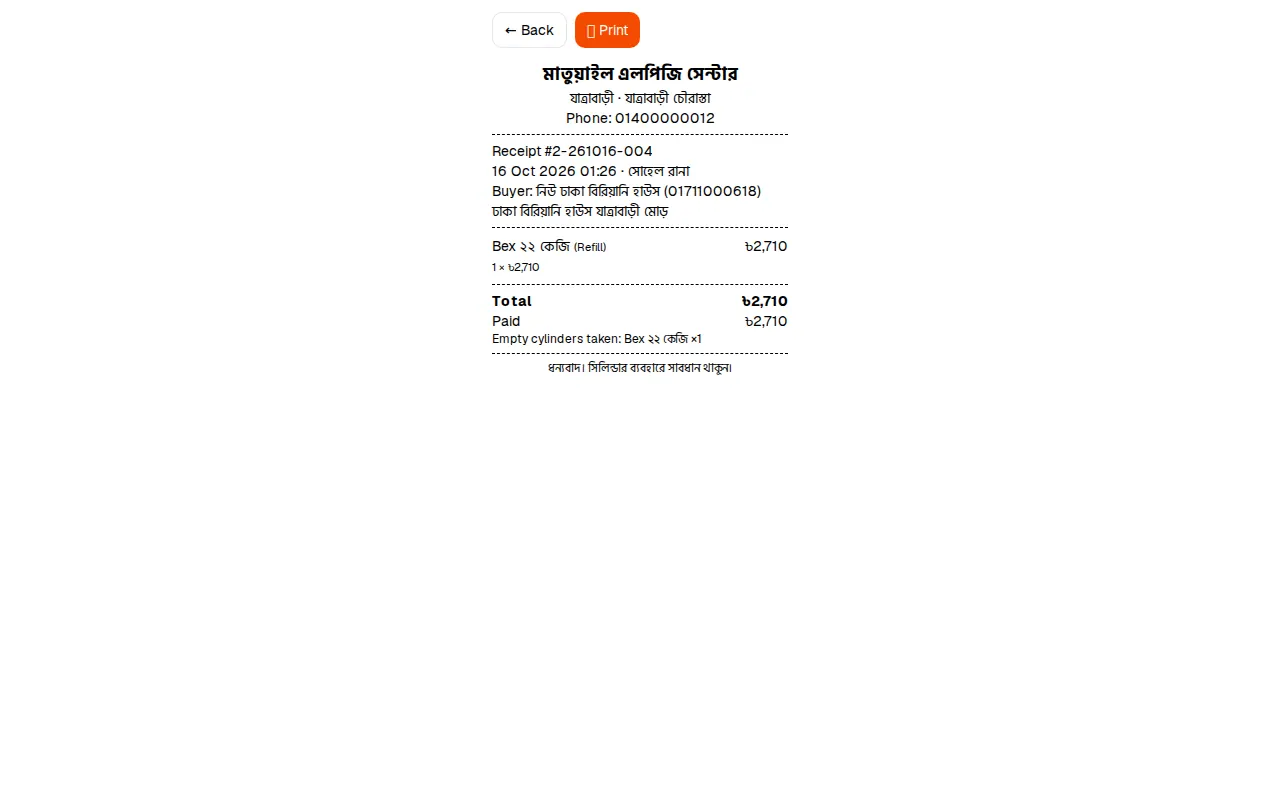
🧾 Receipt opens at 80 mm thermal printer width (it also prints on A4 or to PDF). It shows the company and branch name and address, invoice number, buyer, cylinders, empties taken back, floor charge, total, cash paid and due, with the receipt footer at the bottom. Press Print.
Invoice numbers are branch code-date-serial, e.g. 1-261016-007 = branch 1, the 7th sale on 16 October 2026. Reprint an old receipt from the 🧾 Receipt link under each line on the Daily sheet.
Cancelling a wrong sale
A wrong sale is not deleted but cancelled — the line stays on record, while stock and dues go back to how they were.
- Open the Daily sheet and press Cancel under the sale.
- Type the reason and press OK.
- A delivery man can cancel only his own sales, and only before the day is closed.
- Once the day is closed nobody can cancel — a manager/owner must first Reopen the day (see Daily sheet).
- If part of a credit sale was already collected it says "৳… of this due has already been collected — delete that recovery first".
Then enter the correct sale again.